When handling sensitive transactions, accounts, or contracts, these nodes verify that users are genuine and protect your workflow from fraud.
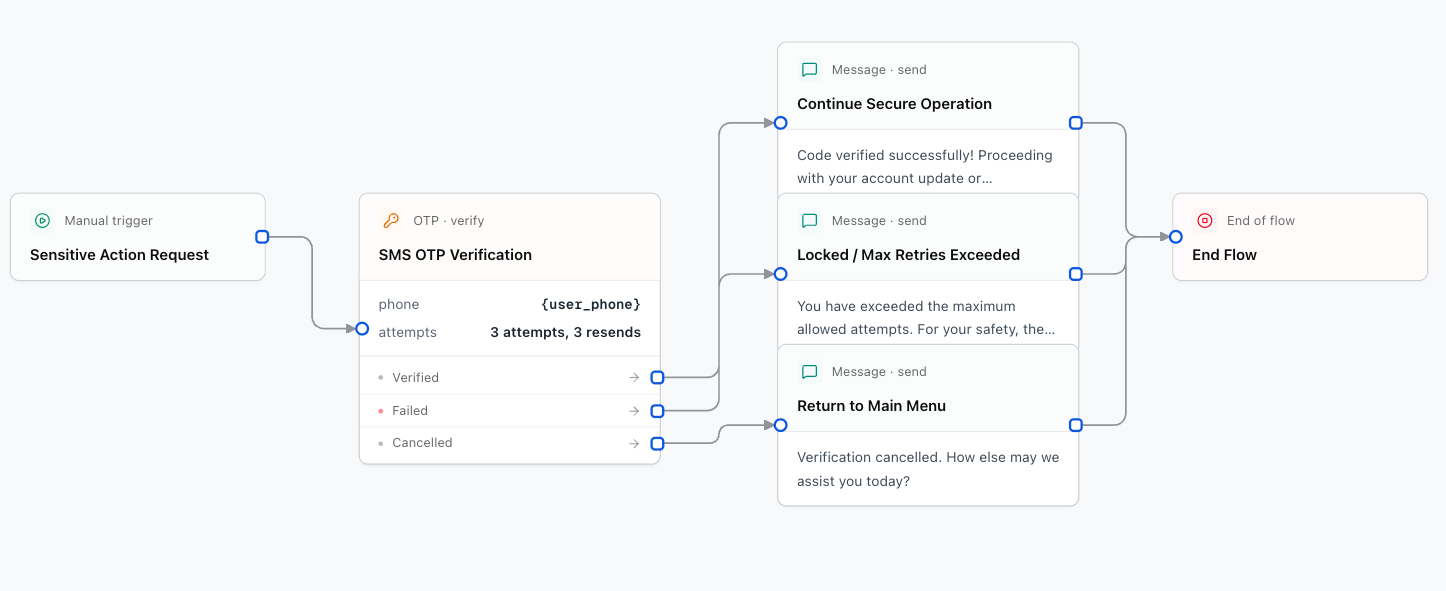
1. OTP Verification Node (SMS Code)
Sends a 6-digit one-time password via SMS to the customer's phone number and validates their reply in the chat.
Canvas Branches:
- Verified: Code matched successfully.
- Failed: User exceeded maximum incorrect attempts.
- Cancel: User chose to cancel verification.
Designer Settings:
Variable containing the recipient's phone number (e.g. {user_phone}).
Prompt asking for the code (e.g., We sent a 6-digit code via SMS. Please enter it here:).
Maximum incorrect code attempts before routing to the failed branch.
2. KYC Verification Node (Official ID & Selfie)
Initiates a Know Your Customer (KYC) flow where the user submits photos of their government ID (passport, national ID, driver's license) and a live selfie.
Designer Settings:
Your Convoflow KYC connection.
Verification workflow template ID.
In WhatsApp, sends a CTA button ("Verify identity") opening the in-app webview.