These blocks let your flows think, make intelligent decisions, and reply naturally using advanced AI models.
1. Agent Node (Intelligent Assistant)
The Agent Node acts as a trained virtual advisor. It can understand what the customer is asking, consult your product manuals, and decide which action to take (such as booking an appointment or saving a record) on its own.
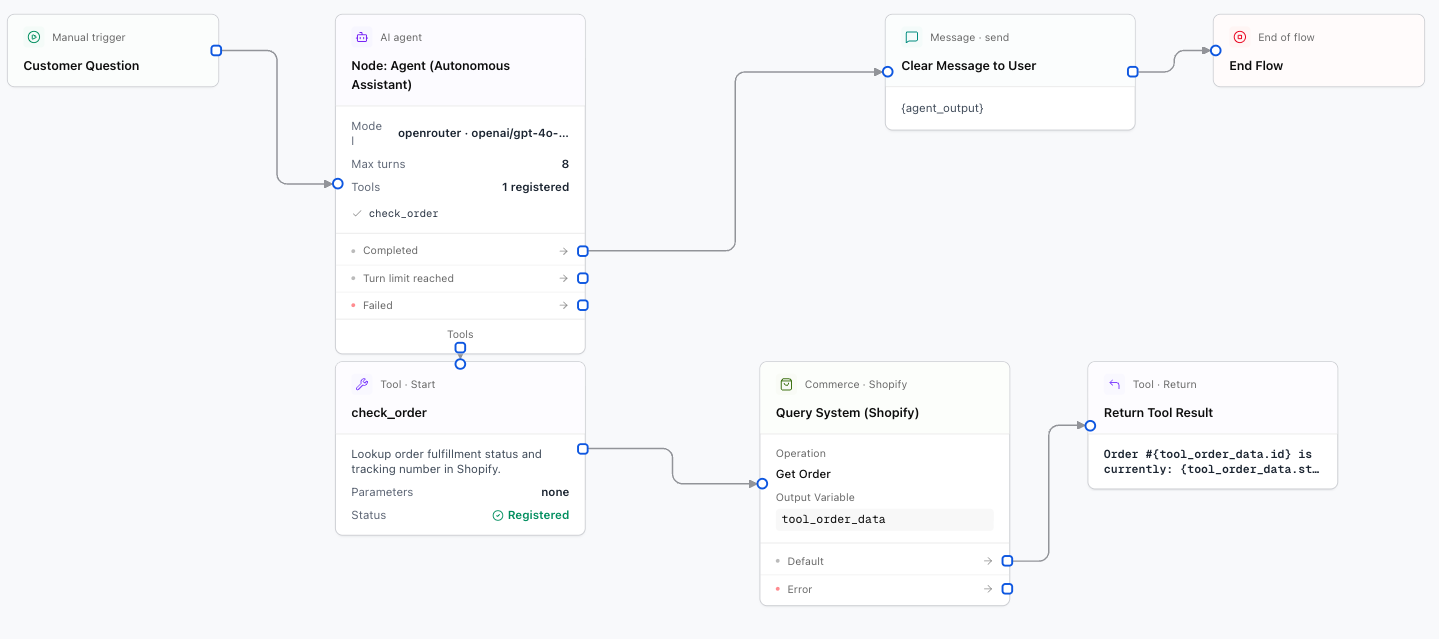
Configuration Fields
Main instructions for your assistant: role, communication tone (formal, friendly, direct), what to answer, and what not to answer.
The AI model that will process the messages (see Artificial intelligence providers for the full list).
Creativity level of the replies. A low value (such as 0.2) produces more precise, direct answers, while a high value produces more varied replies.
List of tools the assistant is allowed to use (for example: check a calendar or search a database).
2. Generate Node (Content Generator)
The Generate Node is used for single-step tasks: summarizing a long conversation, extracting specific data from text, or translating messages.
The instruction you want the AI to perform (e.g. Summarize the following conversation in 3 key points: {chat_history}).
Variable where the summary or generated text will be stored.