Connections in Convoflow securely store and manage your credentials, passwords, and API keys so your assistants can interact with third-party tools.
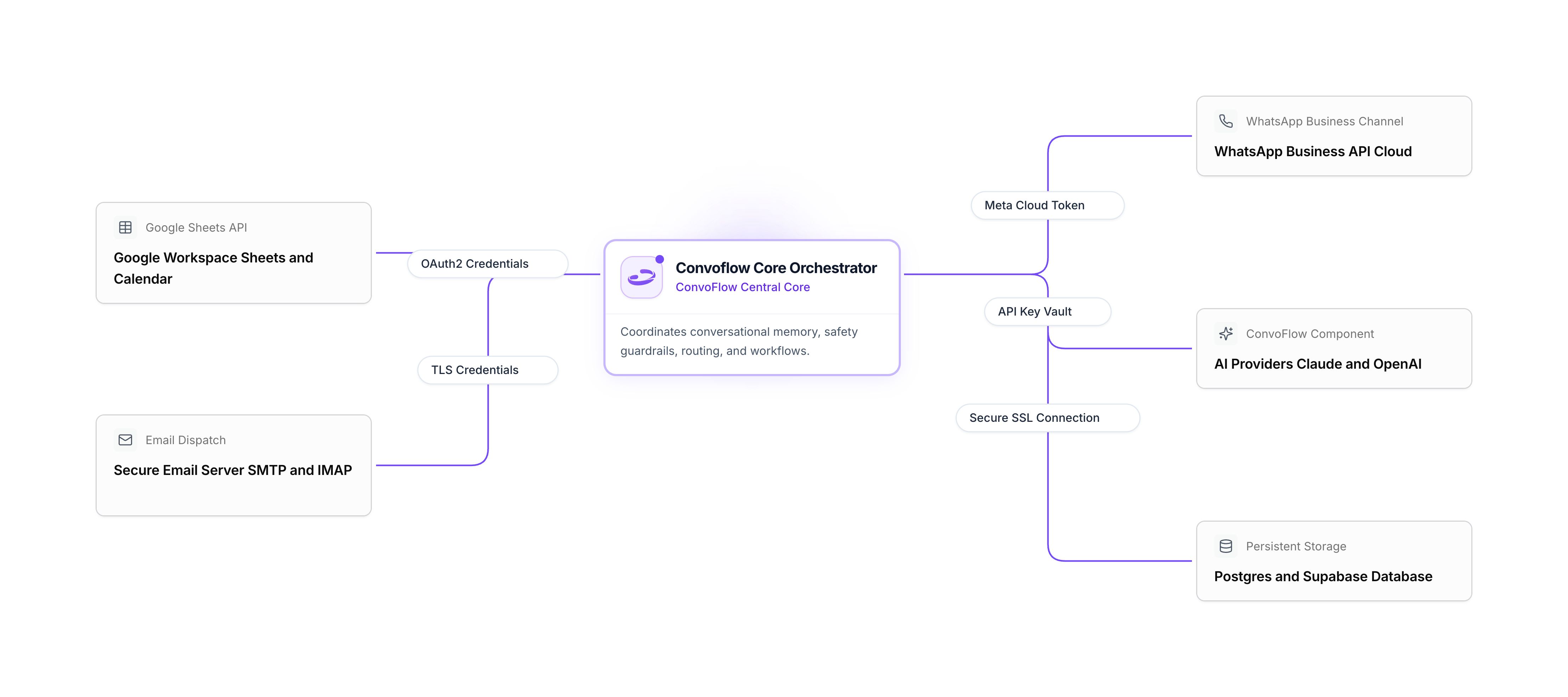
Why Use Centralized Connections?
- Enhanced Security: All credentials and tokens are encrypted at rest. Your flows only reference the connection name rather than exposing keys.
- One-Time Setup: Connect your Google or WhatsApp account once and reuse it across multiple workflows and projects.
- Instant Health Check: Click Test Connection at any time to verify that your credentials are functional.
- Simple Key Rotation: If you update an API key, you only need to change it in one central location.
Available Connection Types
Google Service AccountGoogle
Unified connection for Google Sheets, Google Docs, and Google Calendar.
View guide
Email & SMTP ServersEmail
Send emails through Google Workspace, SendGrid, Resend, or your own SMTP server.
View guide
WhatsApp Cloud APIChannels
Connect official WhatsApp Business numbers via Meta for Developers.
View guide
AI Models & LLMsAI
Supported AI models available to power your agents in Convoflow.
View guide
DatabasesData
Connect PostgreSQL databases, Supabase projects, or Airtable bases.
View guide
Webhooks & HTTP APIsSystems
Set up authentication to connect with your own internal APIs and CRMs.
View guide
Connection Statuses
| Status | Meaning |
|---|---|
| Active | The connection is working properly and ready for use. |
| Error | Credentials failed validation. Please check the entered key. |
| Inactive | Connection was temporarily disabled by an admin. |