Payment nodes allow your assistant to collect payments for orders, appointments, or deposits directly within chat conversations.
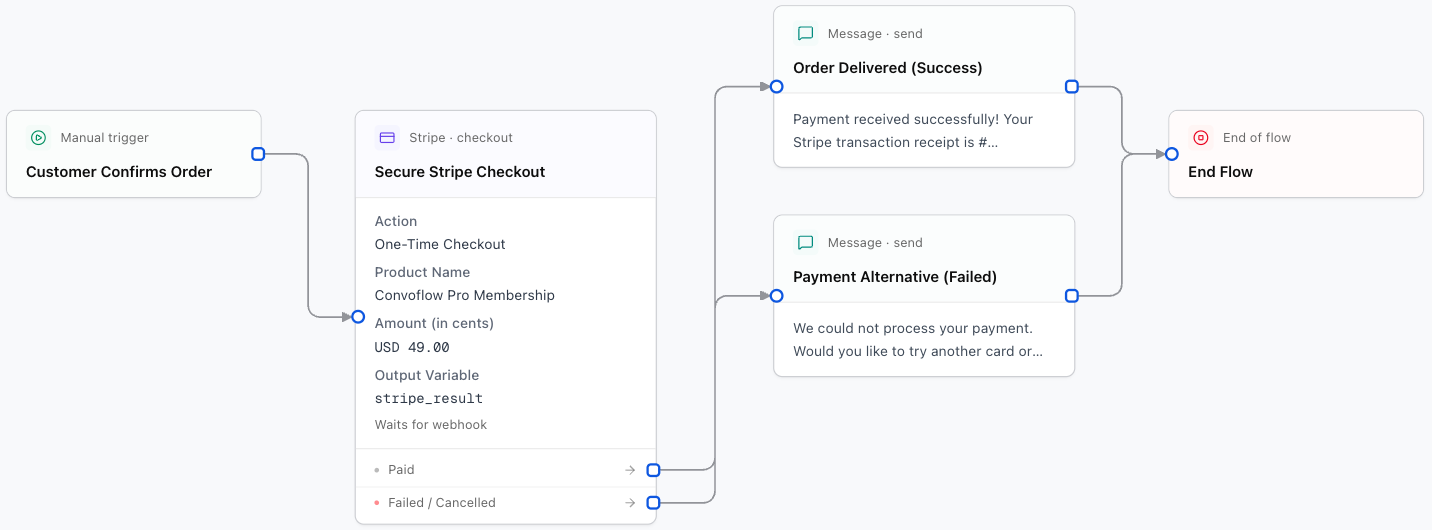
1. Stripe Payment Node
Generates a secure Stripe Checkout session for credit card, debit card, Apple Pay, and Google Pay transactions worldwide.
Designer Settings:
Your connected Stripe account.
Line item title shown during checkout (e.g. Appointment Booking - {user_name}).
Price in cents (e.g. 2500 for $25.00, 10000 for $100.00).
Currency code in lowercase (e.g. usd, eur, mxn).
- Enabled (Recommended): Sends an interactive WhatsApp CTA button, pauses the flow, and resumes upon webhook payment confirmation.
- Disabled: Generates checkout URL and continues immediately.
WhatsApp interactive CTA button label (maximum 20 characters).
2. Recurrente Payment Node
Optimized for processing local payments in Guatemala and Central America (in Quetzales GTQ or Dollars USD).
Designer Settings:
Action: create_one_time_checkout or create_checkout.
Amount in cents (e.g. 10000 for Q100.00 or $100.00).
Currency: GTQ (Quetzales) or USD (US Dollars).
Pauses the conversation and resumes when Recurrente reports payment outcome via webhook.