While AI handles most inquiries effortlessly, some situations require human assistance or manager authorization.
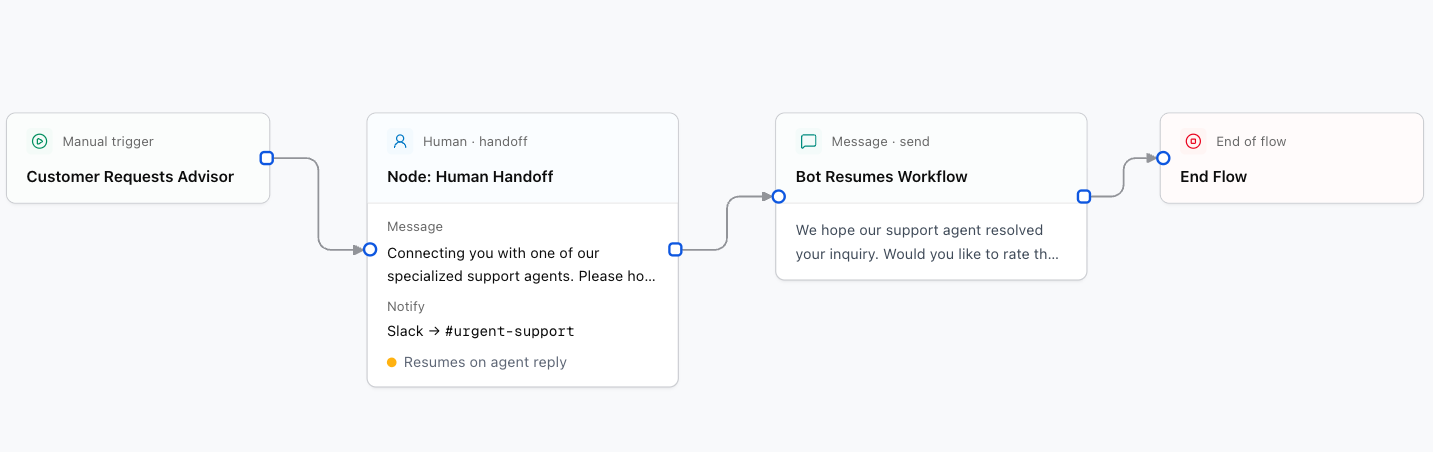
1. Human Handoff Node
Pauses the automated flow and routes the conversation to your human team's inbox inside the Convoflow CRM.
Designer Settings:
Message sent to the user before transferring (e.g., Transferring you to an advisor, please hold on...).
Channel to notify your team: slack, email, whatsapp, or none.
Notification destination (e.g. #urgent-support, support@company.com).
If enabled, the flow resumes automatically when the human agent replies in the CRM.
2. Approval Node
Pauses the flow until a manager or role approves or denies a sensitive action (e.g. issuing a refund or custom discount).
Canvas Branches:
- Approved (
approved): Path followed if the manager approves. - Rejected (
rejected): Path followed if the manager declines.
Target role required for approval (e.g. supervisor, sales_lead).
Question shown to the manager (e.g., Do you approve a {discount_amount} discount for {user_name}?).
3. Assign Role
Assigns the conversation to a specific department or role in the CRM (e.g., sales, support, billing).
The name of the role (e.g., sales, tier2_support).